Set up AI Budgie in 5 minutes
Create an account with your email or Google, answer three questions, and AI Budgie makes your first monthly budget. Prefer to look around first? Start with sample data.
Create your account
- 1
Go to Create account and enter your email, or continue with Google. No card is needed for the 30-day trial.
- 2
Open the link we email you to confirm your address. Links work once, for 24 hours. A password is optional: you can always sign in with an email link.
Answer three questions
- 1
Say roughly how much you take home each month. A rough figure is fine; you can change it any time.
- 2
Tap the categories your money usually goes to: housing, groceries, dining out and so on.
- 3
Your first budget appears, with a suggested amount for each category. Tap Make my budget.
The setup also asks what to call you. Every step can be skipped and changed later.
The suggested amounts come from common shares of income. Rather look around first? Choose Show me with sample data first to explore a month of example spending.
Check your country and currency
Your budget is shown in your country’s currency. You can change the country in Account; that changes the symbol only, amounts aren’t converted.
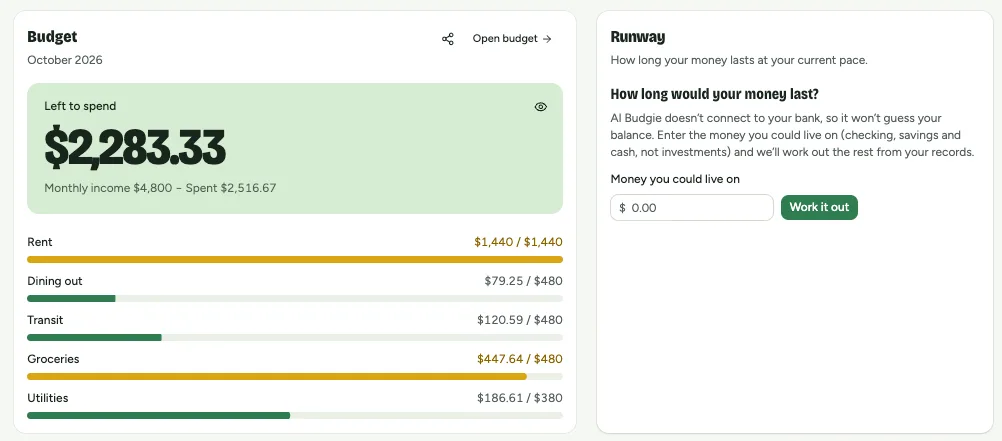
Once it’s set up, the Overview shows what’s left to spend this month and how each category is going:
What to do next
- Record your first purchase by typing a sentence.
- Scan a receipt instead of typing.
- Fine-tune your plan on the Budget page.