A Rocket Money alternative for a budget you keep yourself
Rocket Money is built around linking your bank: it reads your transactions, finds subscriptions and can negotiate bills. Without linked accounts there isn’t much of it left, since even adding a purchase by hand is a Premium feature, and only in the phone app.
If what you actually want is a monthly budget you stick to, and you’d rather not hand over your bank login, here’s an honest comparison, including everything Rocket Money does that AI Budgie doesn’t.
AI Budgie compared with Rocket Money
| AI Budgie | Rocket Money | |
|---|---|---|
| Price | 30-day free trial, then US$4.99/month | Free version; Premium about US$7–14/month, chosen on a slider |
| Works without linking a bank | YesNever asks for a bank login | NoBuilt around linking; adding purchases by hand is Premium, in the app only |
| Monthly budget by category | Yes | PartlyTwo custom categories free; unlimited with Premium |
| How a purchase gets in | One sentence: “Chipotle 14.75 lunch” | From your bank |
| Subscriptions and recurring bills | YesThe ones you add, with reminders in Premium | YesFound automatically, with help cancelling |
| Bill negotiation | No | YesFor about 35–60% of the first year’s savings |
Rocket Money’s price is set by a slider in its app; the ranges are as reported in 2026 reviews.
What Rocket Money does that AI Budgie doesn’t
- Finds and cancels subscriptions. Rocket Money spots recurring charges in your bank data and can cancel some for you. AI Budgie tracks the bills you add; it can’t cancel anything.
- Negotiates bills. For phone, internet and cable bills, Rocket Money will try to lower the price, for a share of what it saves you.
- Everything in one place, for free. Its free version links all your accounts and shows balances and alerts. AI Budgie is free for 30 days, then Premium.
Why people look for a Rocket Money alternative
Linking is the price of entry. Rocket Money needs your bank accounts connected to work. If you’d rather a budgeting app never had that access, it isn’t for you.
The budget is the thin part. The free version gives you two custom budget categories; a real monthly budget means Premium, and some of its prices are billed a year at a time.
The extras cost extra. Bill negotiation takes a share of the first year’s savings, on top of whatever you chose on the slider.
What AI Budgie does instead
A budget first, with no bank connection at all. Tell the assistant “Chipotle 14.75 lunch” and it fills in the date, amount and category for you to confirm, counted against this month’s budget. Rent, phone and streaming go in once as recurring bills.
Try everything for 30 days, no card: a monthly budget by category, recurring bills, reports, savings goals and 5 AI messages a day. Premium is US$4.99 a month after that, one price with nothing to pick, and adds 50 messages a day, CSV import from your bank, overspending alerts, bill reminders and weekly and monthly email summaries.
Start with your past few months
A budget is easier to set when you can see what you’ve been spending. Your bank has that history, and a file is all AI Budgie needs.
Step 1: Download a CSV from your bank
- In online banking, open the account or card and look for “Download” or “Export transactions”.
- Choose CSV and the last two or three months.
- Do the same for each card you use, if you have more than one.
Step 2: Upload it to AI Budgie
Create an account and start Premium (importing is part of it), then open Transactions and choose Import CSV. Drop the file in.
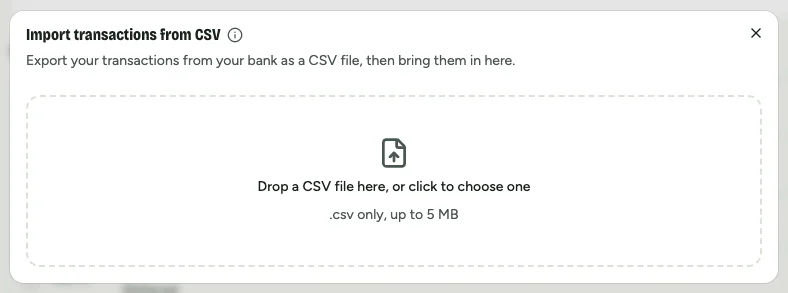
Step 3: Check the columns, then import
Dates, amounts, and money in and out are matched for you; categories with the same name as yours are filed straight away. Glance at the preview, then import. Duplicates are skipped if you import the same file twice.
A budget, without linking your bank
Free for 30 days, no card. Set a monthly budget and add purchases in a sentence.
Start my free trialNo bank connection, ever. Your data isn’t sold or used for ads.
Questions people ask
What is a good alternative to Rocket Money?
It depends on what you used it for. For a monthly budget without linking your bank, AI Budgie lets you add purchases in one sentence and costs US$4.99 a month after a 30-day free trial. For a budget with bank sync, people often look at YNAB (US$109 a year) or Monarch Money (US$99.99 a year).
Can you use Rocket Money without linking a bank account?
Not really. Rocket Money is built around linked accounts, and adding a transaction by hand is a Premium feature that only works in its mobile app, not on the website.
How much does Rocket Money cost?
Rocket Money has a free version. Premium is priced on a slider, about US$7 to US$14 a month, with some prices billed annually. Bill negotiation is charged separately, as a share of about 35% to 60% of the first year’s savings.
Does AI Budgie cancel subscriptions like Rocket Money?
No. AI Budgie tracks the recurring bills you add and, with Premium, reminds you before they’re due, but it doesn’t find subscriptions in your bank data or cancel them for you.
Is AI Budgie free?
For 30 days, with everything included and no card needed. After that there’s no free plan: your budget and transactions stay saved, and Premium, at US$4.99 a month, lets you keep using them.
Rocket Money, YNAB and Monarch Money are trademarks of their owners. AI Budgie isn’t affiliated with them. Prices and features checked October 2026.