An EveryDollar alternative that makes budgeting by hand fast
EveryDollar’s free version is a solid zero-based budget, but every purchase goes into a form by hand: amount, merchant, category, date. Bank sync is the Premium upgrade, at US$79.99 a year or US$17.99 a month.
If you don’t need your bank connected but you’re tired of the typing, AI Budgie takes a different path: one sentence per purchase. Here’s an honest comparison, including where EveryDollar is the better pick.
AI Budgie compared with EveryDollar and EveryDollar Premium
| AI Budgie | EveryDollar | EveryDollar Premium | |
|---|---|---|---|
| Price | 30-day free trial, then US$4.99/month (C$6.99 in Canada) | Free | US$79.99/year or US$17.99/month, after a 14-day trial |
| Monthly budget by category | Yes | YesZero-based | YesZero-based |
| Bank sync | NoOn purpose | No | YesMajor US banks |
| How a purchase gets in | One sentence: “Target 32.50 diapers and snacks” | Typed into a form | From your bank, or typed in |
| Works in Canada | YesIn Canadian dollars | PartlyWebsite only | NoUS only |
Prices as published in October 2026.
Where EveryDollar is better
- It’s free, for good. EveryDollar’s free version never ends. AI Budgie is free for 30 days; after that, your data stays but you need Premium to keep using it.
- A whole plan around the budget. If you follow Dave Ramsey’s Baby Steps, EveryDollar is built for them, and Premium adds paycheck planning and live coaching.
- Bank sync, if you want it. Premium pulls transactions from most major US banks. AI Budgie doesn’t connect to banks at all.
Why people look for an EveryDollar alternative
Typing every transaction into a form gets old. The free version is manual, and manual there means filling in fields for each purchase. It’s the step that slips first when life gets busy.
Sync costs US$79.99 a year. If what you really want from Premium is less typing, that’s a lot to pay for it.
It comes with a philosophy. EveryDollar is tied to the Ramsey approach. If you don’t follow it, a lot of the app is pointing you somewhere you aren’t going.
Outside the US, it’s limited. In Canada there’s only the free version, on the website; Premium and the phone apps need the US.
What AI Budgie does instead
Still by hand, but one sentence instead of a form. Tell the assistant “Target 32.50 diapers and snacks” and it fills in the date, amount and category for you to confirm, counted against this month’s budget.
Try everything for 30 days, no card: a monthly budget by category, recurring bills, reports, savings goals and 5 AI messages a day. Premium is US$4.99 a month after that (US$59.88 a year; C$6.99 a month in Canada) and adds 50 messages a day, CSV import from your bank, overspending alerts, bill reminders and weekly and monthly email summaries.
Start with your past few months
A budget is easier to set when you can see what you’ve been spending. Your bank already has that history.
Step 1: Download a CSV from your bank
- In online banking, open the account or card and look for “Download” or “Export transactions”.
- Choose CSV and the last two or three months.
- Do the same for each card you use, if you have more than one.
Step 2: Upload it to AI Budgie
Create an account and start Premium (importing is part of it), then open Transactions and choose Import CSV. Drop the file in.
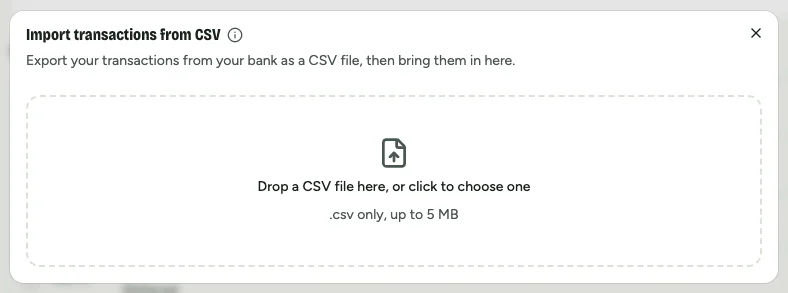
Step 3: Check the columns, then import
Dates, amounts, and money in and out are matched for you; categories with the same name as yours are filed straight away. Glance at the preview, then import. Duplicates are skipped if you import the same file twice.
Keep the budget, lose the forms
Free for 30 days, no card. Set a monthly budget and add purchases in a sentence.
Start my free trialNo bank sync, on purpose. Your data isn’t sold or used for ads.
Questions people ask
Is EveryDollar really free?
Yes. EveryDollar has a free version with a zero-based budget, where you enter every transaction by hand. Bank sync, paycheck planning and coaching are in EveryDollar Premium, which costs US$79.99 a year or US$17.99 a month after a 14-day free trial.
Does EveryDollar connect to your bank?
Only with Premium. EveryDollar Premium can sync with most major US banks and credit unions. The free version doesn’t connect to banks; you add each transaction yourself.
What is a cheaper alternative to EveryDollar Premium?
It depends on whether you need bank sync. AI Budgie doesn’t sync with banks, but it makes adding purchases fast (one sentence each) and costs US$4.99 a month, US$59.88 a year, after a 30-day free trial. If you want sync, YNAB is US$109 a year and Monarch Money US$99.99 a year.
Does EveryDollar work in Canada?
Partly. Canadians can use the free version of EveryDollar on its website, but EveryDollar Premium and the mobile apps are only for the US. AI Budgie works in Canada in Canadian dollars, at C$6.99 a month after a 30-day free trial.
Is AI Budgie free?
For 30 days, with everything included and no card needed. After that there’s no free plan: your budget and transactions stay saved, and Premium, at US$4.99 a month (C$6.99 in Canada), lets you keep using them.
EveryDollar, Ramsey, YNAB and Monarch Money are trademarks of their owners. AI Budgie isn’t affiliated with them. Prices and features checked October 2026.