A simpler way to budget than Actual Budget — no server, no setup
Actual Budget is free, open source, and keeps your data local or on a server you run yourself — no company holds your budget. The trade-off: you set it up, and bank sync (if you want it) means connecting a separate service like SimpleFIN or GoCardless.
AI Budgie takes the opposite trade-off: there’s nothing to install or host. You just type what you spent, and it’s never connected to your bank at all — so there’s no sync to configure in the first place.
AI Budgie compared with Actual Budget
| AI Budgie | Actual Budget | |
|---|---|---|
| Price | 30-day free trial, then US$4.99/month (C$6.99 in Canada) | Free and open source; paid hosting (such as PikaPods) is optional |
| Getting started | YesSign up and start typing | PartlyInstall the app, and host or pay someone to host a sync server |
| Bank connection | NoNever, by design | PartlyOptional, through SimpleFIN or GoCardless |
| How a purchase gets in | One sentence: “Starbucks yesterday, 5 bucks” | Typed into a form, or imported from a file or bank sync |
| Where your data lives | NoOn AI Budgie’s servers | YesLocal, or your own server — fully in your control |
| Envelope-style category budgeting | Yes | Yes |
Prices as published November 2026.
Where Actual Budget is better
- You own your data completely. It’s local-first and open source — nothing sits on anyone else’s server unless you choose to host it there yourself.
- No subscription, ever. The software is free forever; you only pay if you choose a hosted sync option.
- Deep, flexible envelope budgeting. Built by and for people who want full control over categories and rules.
Why people look for something simpler than Actual Budget
Self-hosting isn’t for everyone. Running your own server, or trusting a third-party host, is an extra step most budgeting apps don’t ask for.
Bank sync means another account. Automatic sync means signing up for SimpleFIN or GoCardless separately and keeping that connection working.
It’s built for people who already like tinkering. If you just want to open an app and start typing what you spent, the setup can be more than you’re looking for.
What AI Budgie does instead
Tell the assistant what you bought, like “Starbucks yesterday, 5 bucks”. It fills in the date, amount and category, you confirm, and it counts against this month’s budget. Nothing to install, host or keep running. On an iPhone, a Shortcut can record Apple Pay payments as you make them.
What we do see: what you type and the purchases you add. When you use the assistant, your message is sent to OpenAI to be read; under OpenAI’s API policy it isn’t used to train their models. We never sell your data or use it for ads.
Try everything for 30 days, no card: a monthly budget by category, recurring bills, reports, savings goals and 5 AI messages a day. Premium is US$4.99 a month after that (C$6.99 in Canada) and adds 50 messages a day, CSV import, overspending alerts, bill reminders and weekly and monthly email summaries.
Already tracking in Actual Budget? Bring your history over
Actual Budget can export an account’s transactions as a file. Bring that file into AI Budgie instead of setting up a new sync.
Step 1: Export your transactions from Actual Budget
- Open the account you want to bring over, and use its export option to save the register as a file.
- If your bank also offers a CSV/OFX/QFX export directly, that works too.
Step 2: Upload it to AI Budgie
Create an account and start Premium (importing is part of it), then open Transactions and choose Import CSV. Drop the file in.
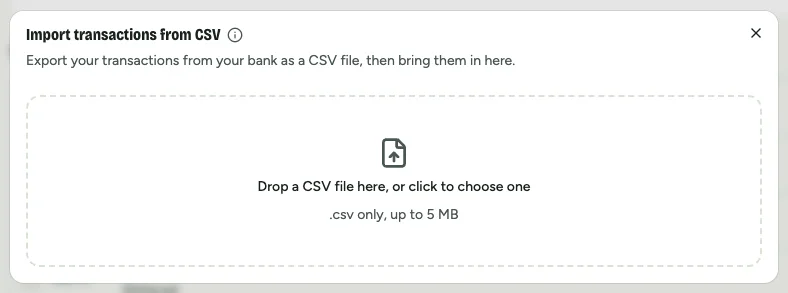
Step 3: Check the columns, then import
Dates, amounts, and money in and out are matched for you; categories with the same name as yours are filed straight away. Glance at the preview, then import. Duplicates are skipped if you import the same file twice.
Budget without running a server
Free for 30 days, no card. Set a monthly budget and add purchases in a sentence.
Start my free trialNo bank connection, ever. Your data isn’t sold or used for ads.
Questions about Actual Budget and AI Budgie
Is there a simpler alternative to Actual Budget?
If you don’t want to self-host or manage a sync server, AI Budgie is the simpler route: sign up and start typing what you spent, with no install step. You trade local data ownership for zero setup.
Does AI Budgie store my data locally like Actual Budget?
No — that’s the main trade-off between the two. Actual Budget keeps your data on your own device or server. AI Budgie stores your data on its own servers so there’s nothing for you to host or back up yourself.
Can I import my Actual Budget data into AI Budgie?
Yes. Export an account’s transactions as a file from Actual Budget, then import that CSV into AI Budgie under Transactions → Import CSV.
Does Actual Budget connect to my bank automatically?
Only if you set it up: bank sync is optional, through SimpleFIN (US and Canada) or GoCardless (EU/UK). Without it, you type transactions in or import a file, same as AI Budgie always does.
Is Actual Budget really free?
The software itself is free and open source. You only pay if you choose a hosted sync service, such as PikaPods, instead of running the server yourself.
Actual Budget, SimpleFIN and GoCardless are trademarks of their owners. AI Budgie isn’t affiliated with them. Prices and features checked November 2026.