The best budgeting apps without bank linking in Canada (2026)
Most budgeting apps want your online banking login on day one. If you’d rather not hand that over, or your Canadian bank keeps dropping its connection, you need an app that works fine without it. We checked eight apps on four things only: whether you must link a bank, what it costs, how transactions get in, and whether your partner or family can share it.
We make one of them, AI Budgie, and say so. Every other fact comes from that app’s own website, checked on November 4, 2026, with the links under the list. Where an app is better than ours, we say that too.
8 budgeting apps, without linking a bank
Ranked for one reader: someone in Canada who wants a budget without giving any app their bank login. If you’re happy to link your bank, the order would be different.
1.AI BudgieOurs
30 days free, then C$6.99/month in Canada (US$4.99 elsewhere)Best for: A monthly budget in CAD that never asks for a bank login.
There is no bank connection at all: you type a purchase as one sentence, send a receipt photo, or import your bank’s CSV. Family is C$11.99/month (US$8.99) for up to 6 people. No yearly price, no investment tracking, and no app-store app yet: it runs in your browser.
2.YNAB
US$14.99/month or US$109/yearBest for: A strict zero-based method, with sync for select Canadian banks if you want it later.
Linking is optional: unlinked accounts take typed-in transactions and file imports. Up to six people share one subscription. Priced in US dollars, with a 34-day free trial.
3.Actual Budget
Free and open source (paid hosting optional)Best for: People comfortable running their own software.
Imports QIF, OFX, QFX, CAMT.053 and CSV, and bank sync is optional (SimpleFIN for North American banks). You host it yourself or pay a host such as PikaPods. Several users need an OpenID login set up on your server.
4.Goodbudget
Free plan; Premium US$10/month or US$80/yearBest for: Envelope budgeting for a couple, at no cost.
The free plan allows 10 regular and 10 annual envelopes, 1 account, 2 mobile devices and 1 year of history. Premium’s bank sync covers US banks only, so in Canada you enter spending yourself either way.
5.Monarch Money
US$14.99/month or US$99.99/yearBest for: Bank sync, investments and net worth, with a no-link fallback.
Built around bank sync, but manual accounts take typed-in transactions and CSV uploads. Partners get their own logins at no extra cost. Billed in USD in Canada, with 7 days free.
6.EveryDollar
Free version; Premium US$17.99/month or US$79.99/yearBest for: Zero-based budgeting in the US.
The free version is typed in and never links a bank. In Canada only that free web version works, in US dollars: no Premium and no mobile app.
7.Copilot Money
US$9/month or US$109/yearBest for: Americans on Apple devices who want polished bank sync.
Works with US-based accounts only and isn’t available outside the US, so it isn’t an option in Canada. You can add manual transactions; whether it works with no linked bank at all is not confirmed. Partner sharing is listed as coming soon.
8.Rocket Money
Free plan; Premium is a price you chooseBest for: Americans who want to track and cancel subscriptions.
Only for US-based members and banks, so not an option in Canada. Premium is a sliding scale you pick yourself, after a 7-day trial; Premium+ is US$15/month.
Prices as published on November 4, 2026, in US dollars unless noted. Check each app’s own site before you choose.
Official sources, checked November 4, 2026: YNAB pricing · YNAB without Direct Import · Monarch pricing · Monarch in Canada · Monarch for couples · Monarch manual accounts · Copilot pricing · Copilot FAQ · Rocket Money cost · Rocket Money countries · Goodbudget plans · Actual Budget · Actual bank sync · Actual multi-user · EveryDollar · EveryDollar outside the US
Why “no bank linking” matters more in Canada
Two of the eight, Copilot Money and Rocket Money, only work with US accounts. Goodbudget’s and EveryDollar’s bank sync is for US banks, so in Canada they are typed-in apps whatever you pay. Monarch’s own Canada page suggests using the 7-day trial to check that your institutions connect reliably.
Price is the other Canadian catch: YNAB, Monarch and EveryDollar charge in US dollars. AI Budgie charges Canadians in CAD (C$6.99 a month) and shows amounts in Canadian dollars.
Coming from Mint? See our Mint alternatives for Canada, which also covers bringing your Mint history. For the wider case against bank connections, see budgeting without a bank connection.
Bank linking, price, how transactions get in, and sharing
| AI Budgie | YNAB | Monarch | Copilot | Rocket Money | Goodbudget | Actual | EveryDollar | |
|---|---|---|---|---|---|---|---|---|
| Must you link a bank? | NoNever. There is no bank connection | NoOptional. Unlinked accounts work | PartlyBuilt around sync. Manual accounts exist | Not confirmed. Built around sync | YesWorks with linked US banks | NoSync is Premium, US banks only | NoOptional | NoNot on the free version |
| Price, monthly | C$6.99 in Canada, US$4.99 elsewhere. Family C$11.99 / US$8.99 | US$14.99 | US$14.99, billed in USD in Canada | US$9 | Free plan. Premium: a price you choose. Premium+ US$15 | Free plan. Premium US$10 | Free. Optional paid hosting | Free version. Premium US$17.99 |
| Price, yearly | None: monthly only | US$109 | US$99.99 | US$109 | Not confirmed | US$80 | — | US$79.99 |
| Free trial | 30 days, no card | 34 days | 7 days | 1 month | 7 days of Premium | Free plan | Free | 14 days of Premium |
| How transactions get in | One typed sentence (AI), a receipt photo, or a CSV import (Premium) | Bank sync, typed in, or file import (CSV, OFX, QFX) | Bank sync, typed into manual accounts, or CSV | Bank sync with AI clean-up, or added by hand | Bank sync | Typed in; bank sync with Premium (US banks) | File import (QIF, OFX, QFX, CAMT.053, CSV) or optional sync | Typed in; bank connect with Premium |
| Family or partner sharing | YesFamily plan: up to 6 people, with private spending | YesUp to 6 people on one subscription | YesPartners get their own login, no extra cost | NoListed as coming soon | Not confirmed | Yes2 mobile devices free, 5 with Premium | PartlyMulti-user via OpenID on your own server | YesOne household budget, separate logins |
| Works in Canada | YesMade in Canada, amounts in CAD | YesPriced in USD | YesBilled in USD | NoUS only | NoUS only | No country limit stated; sync is US banks only | Yes | PartlyFree web version only, in USD |
From each app’s own website, checked November 4, 2026. “Not confirmed” means the official site doesn’t say.
Where the others are better
- Nothing to type. YNAB, Monarch and Copilot pull purchases in from your bank. With AI Budgie, a purchase you don’t mention isn’t in your budget.
- Investments and net worth. Monarch and Copilot track far more of your money than a monthly budget. AI Budgie doesn’t track investments.
- Free for good. Actual is free and open source, and Goodbudget and EveryDollar have free plans you can keep. AI Budgie is paid after its 30-day trial.
- A yearly discount and phone apps. YNAB, Monarch, Copilot, Goodbudget and EveryDollar sell yearly plans. AI Budgie is monthly only, and runs in your browser rather than from an app store.
Why people skip bank linking
A third party keeps access. Sync works by keeping a data provider connected to your accounts so new transactions keep arriving. For some people a budget isn’t worth that.
Canadian connections are patchy. Several of these apps are built for US banks first, and a half-synced budget is harder to trust than one you kept yourself.
Typing it is noticing it. When every purchase arrives on its own, it’s easy to stop looking. Saying what you spent is the moment you notice it.
How AI Budgie works without a bank
Tell the assistant “Loblaws 86, groceries” or send a photo of the receipt. It fills in the date, amount and category, you confirm, and it counts against this month’s budget. There is no connection to approve, renew or break.
For a household, Family puts up to 6 people on one shared monthly budget, while each person’s own spending stays private by default. It’s C$11.99 a month in Canada (US$8.99 elsewhere), paid by one person.
What we see is what you type and the purchases you add. When you use the assistant, your message is sent to OpenAI to be read, and a receipt photo isn’t kept. We never sell your data or use it for ads.
Want your bank history anyway? Use a file, not a login
Canadian banks let you download transactions in online banking. That brings your past months into AI Budgie without giving anyone access to your account.
Step 1: Download a CSV from your bank
- In online banking, open the account or card and look for “Download” or “Export transactions”.
- Choose CSV and the months you want. Three months is enough to set a realistic budget.
- Coming from YNAB, Monarch or Mint? Their exports import too.
Step 2: Upload it to AI Budgie
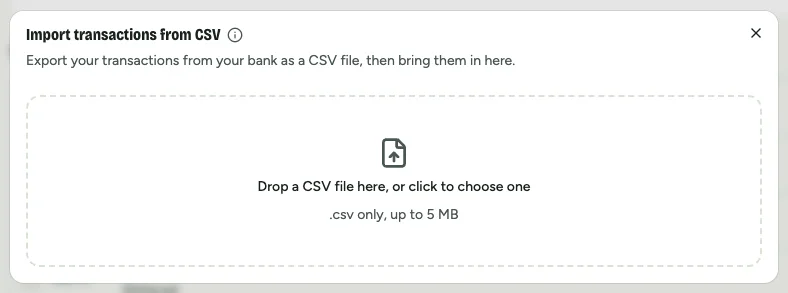
Create an account and start Premium (importing is part of it), then open Transactions and choose Import CSV. Drop the file in.
Step 3: Check the columns, then import
Dates, amounts, and money in and out are matched for you; categories with the same name as yours are filed straight away. Glance at the preview, then import. Duplicates are skipped if you import the same file twice.
Budget in CAD without linking your bank
Free for 30 days, no card. Set a monthly budget and add purchases in a sentence or a photo.
Start my free trialNo bank connection, ever. Your data isn’t sold or used for ads.
Questions about budgeting without bank linking in Canada
Does AI Budgie work without linking my bank?
Yes. AI Budgie has no bank connection at all. You add a purchase by typing one sentence to its assistant, by sending a receipt photo, or by importing a CSV file you download from your bank.
Is it safe to use a budgeting app without bank linking?
Without bank linking, no app or data provider holds ongoing access to your accounts, and your online banking password never leaves your bank. AI Budgie only sees what you type and the purchases you add. Assistant messages are sent to OpenAI to be read, receipt photos are not kept, and your data is never sold or used for ads.
Does it work in Canada with Canadian accounts and CAD?
Yes. AI Budgie is made in British Columbia, shows amounts in Canadian dollars, and charges Canadians in CAD. Because it never connects to a bank, it works the same whichever Canadian bank or credit union you use, and you can import a CSV from any of them.
Can my partner share the account?
Yes, with the Family plan: up to 6 people share one monthly budget, with shared bills, goals and transactions, while each person’s own spending stays private by default. One person pays for the household.
How much does AI Budgie cost in Canada?
Premium is C$6.99 a month in Canada and US$4.99 a month elsewhere. Family is C$11.99 a month in Canada and US$8.99 elsewhere. Both are billed monthly; there is no yearly price yet.
Is there a free trial?
Yes. Every new account gets 30 days free with no card. After that, choose Premium or Family to keep going; nothing is charged on its own.
Which budgeting apps work in Canada without linking a bank?
AI Budgie never links a bank. YNAB and Monarch both work in Canada without linking, through typed-in transactions and file imports, and are billed in US dollars. Goodbudget’s bank sync is for US banks only, so in Canada you enter spending yourself, and Actual Budget imports files with bank sync optional. Copilot Money and Rocket Money are US-only.
YNAB, Monarch Money, Copilot Money, Rocket Money, Goodbudget, Actual Budget, EveryDollar and Mint are trademarks of their owners. AI Budgie isn’t affiliated with them. Prices and features checked November 4, 2026, from each app’s own website.